Wizard's study


Stills from the wizard's study, showing base objects, materials and the final render
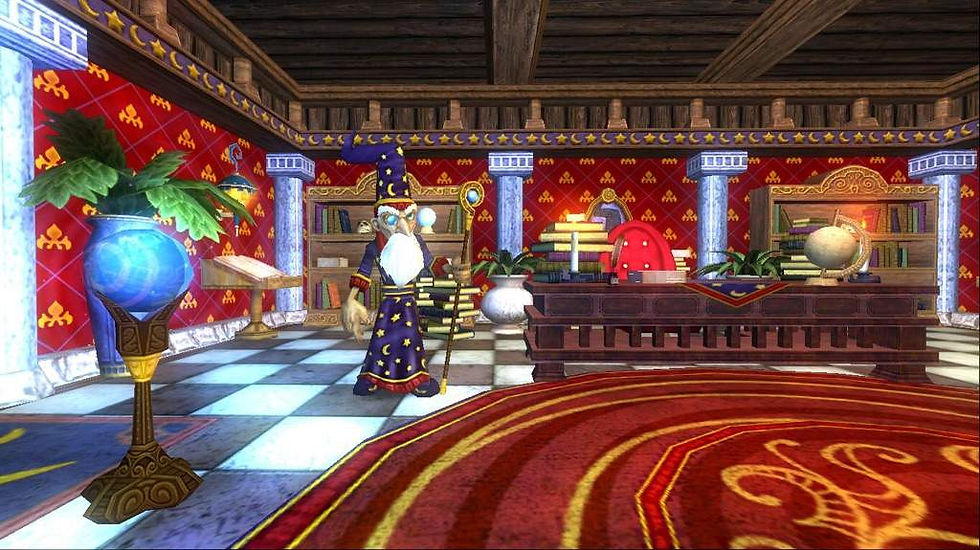
The wizard's study is a 3D stylized environment. I wanted to create a scene depicting what my interpretation of a fantasy interior looks like, because most of my other works are more sci fi or realistic. Before I began working on the project I went to look at inspiration. I looked at Art nouveau movement, Whimsigoth aesthetic, and the online game Wizard101. (Pictured below is screenshots from the video game Wizard101)
Taking inspirations i identified a few key things that i wanted to utilize in the scene:
- Magical artifacts: Fill the room with mystical artifacts to convey the room belongs to an advanced wizard, the magical artifacts need to be eye catching but cohesive
- Stylized: The environment needs to look stylized in a way that makes this interior look cozy, something you want to walk in and explore
-Non-Realistic lighting: I did not want any blacks to be present in the lighting, I wanted oranges and warm tones to be the light, and blues and other cool tones to be the shadow color. Having the lighting be more colorful can further enforce the cozy atmosphere.


I hand modeled everything in the scene to make it feel more stylized and cohesive in its design. If i only did a few models and then sourced others from online, the models would have different resolutions and modeling all of the models gives me complete control of it.
Originally i was going to make a single blender file for the assets and then pool them together in the final scene assembly. However, I did not do that, because after making the first couple of models(treasure chest and the bookcase) I wanted to play around with these models after enjoying them so much.
the background is just a 2D plane, jest extruded and manipulated simply.
One Important thing I learned from this was duplicating objects vs. Instancing objects in blender: Where I am more used to just copy and pasting or just duplicating (shift+D) objects in blender, i found instancing objects in the scene to be much more useful. Instancing objects would not only duplicate them, but any changes i made with UV's or Textures would follow through.
The most Eye-catching object in the scene is the Orrery(the big moving planet thing by the window). The window itself was based off the works of Illustrator and painter Alphonse Mucha and his Art Nouveau art style. the final window was chosen to be orange, to contrast against the mostly blue interior. The Orrery itself is just a the same math function put into the rotational axis, just with a few differences. Using "#frame=40" on the z-rotational axis was the only math function I used for the orrery, just changing the number between halfling it for smaller gears and setting the integer to a negative would make colliding gears seem to work together, clipping at a very small instance. Taking inspiration from the Michael Bay Transformers visual effects philosophy of having everything in front of the camera practically work. Every gear, every rotation the Orrery does is technically correct, the speed, and nothing clips into itself .
The other math function is the mystical orb on the ground floor. it just does "sin(frame=10)+14" to move it up and down on a sine wave offset vertically by 14m.
While i did hand model and animate everything, I sourced almost the textures from https://freestylized.com/all-textures. their stylized look of textures is exactly what i was looking for. The star ceiling pattern, the glass, and the sun texture I made myself in Photoshop.
the paintings in the scene are done by Rebecca Guay, Raphael and Alphonse Mucha
For the lighting, i worked to make as many lights practical, which means having the light come from realistic places. That being said, the glass and transparent textures on the glass don't entirely allow the light to come through, so i had to compensate with area lights to let the scene be better lit. The torches were also a challenge. I wanted to use keyframes and a noise modifier to allow the lights to 'flicker' like real flames, though its only noticeable on one shot for the final render. I chose not to fix them because i wanted to get this render done. If I had unlimited time, i would definitely work on that, but the project overall is not affected by it's success or failure.